
 ABSign for iOS · v1.8.0 tutorial
From download to signed.
Eight steps on your phone.
A hands-on walkthrough of the ABSign app — every tap, from picking a rental template to sealing a cross-border contract and tracking it to the end. No printer involved at any point.
Install the app
Open the App Store on your iPhone or iPad, search for ABSign, and tap Get. The app is free to download — you only pay when you choose a paid plan for higher volumes or team features.
Prefer a link? Tap the App Store badge in the header of this page, or the download button at the bottom.
- ✓Works on iPhone and iPad — one download covers both, and your contracts stay in sync.
- ✓Needs iOS 15.0 or later. Check yours under Settings → General → About.
- ✓No Android version yet — the web platform at abroadsign.com works in any mobile browser in the meantime.
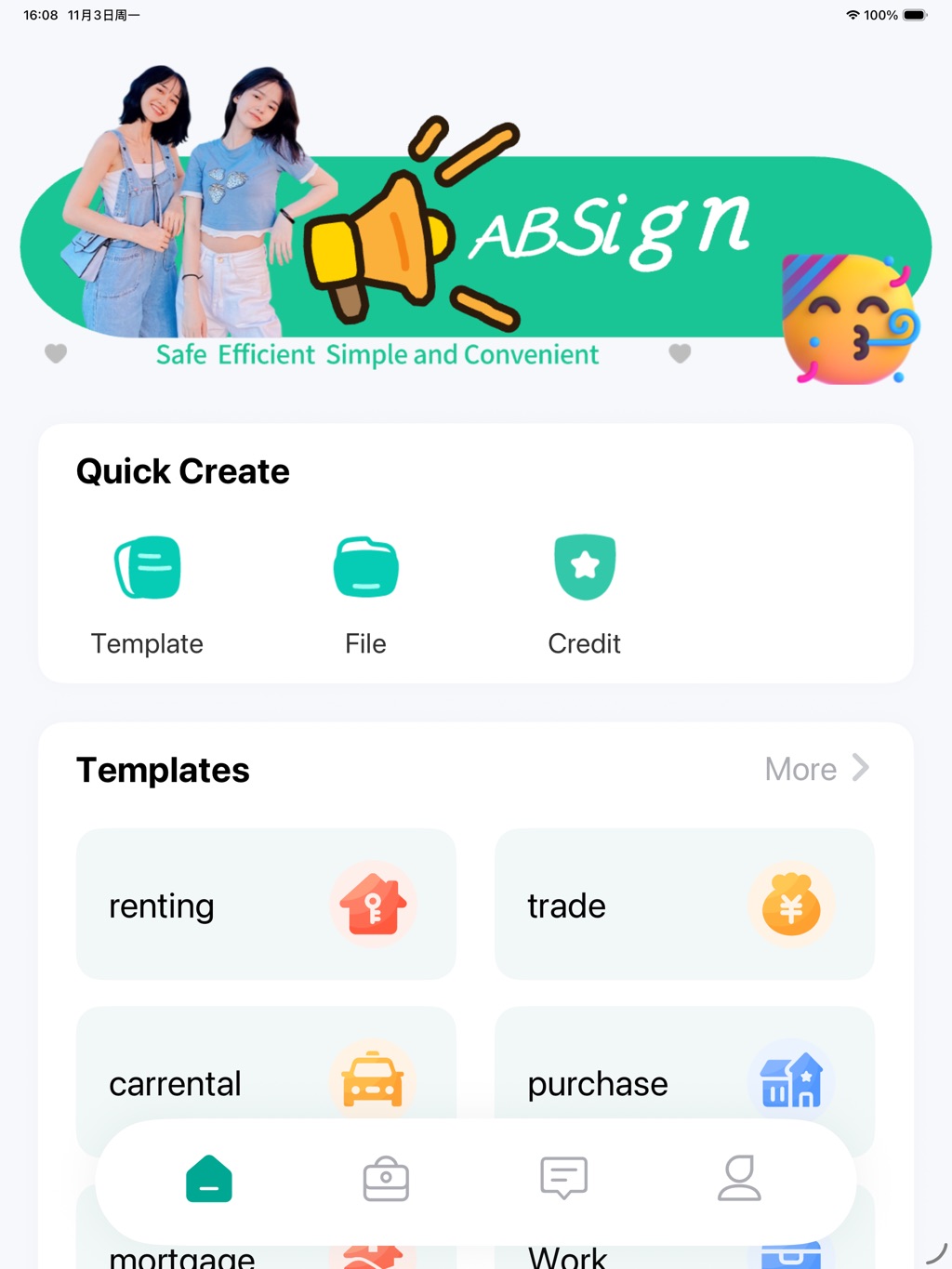
First launch: the ABSign home screen
Know the screen — four tabs, that’s all
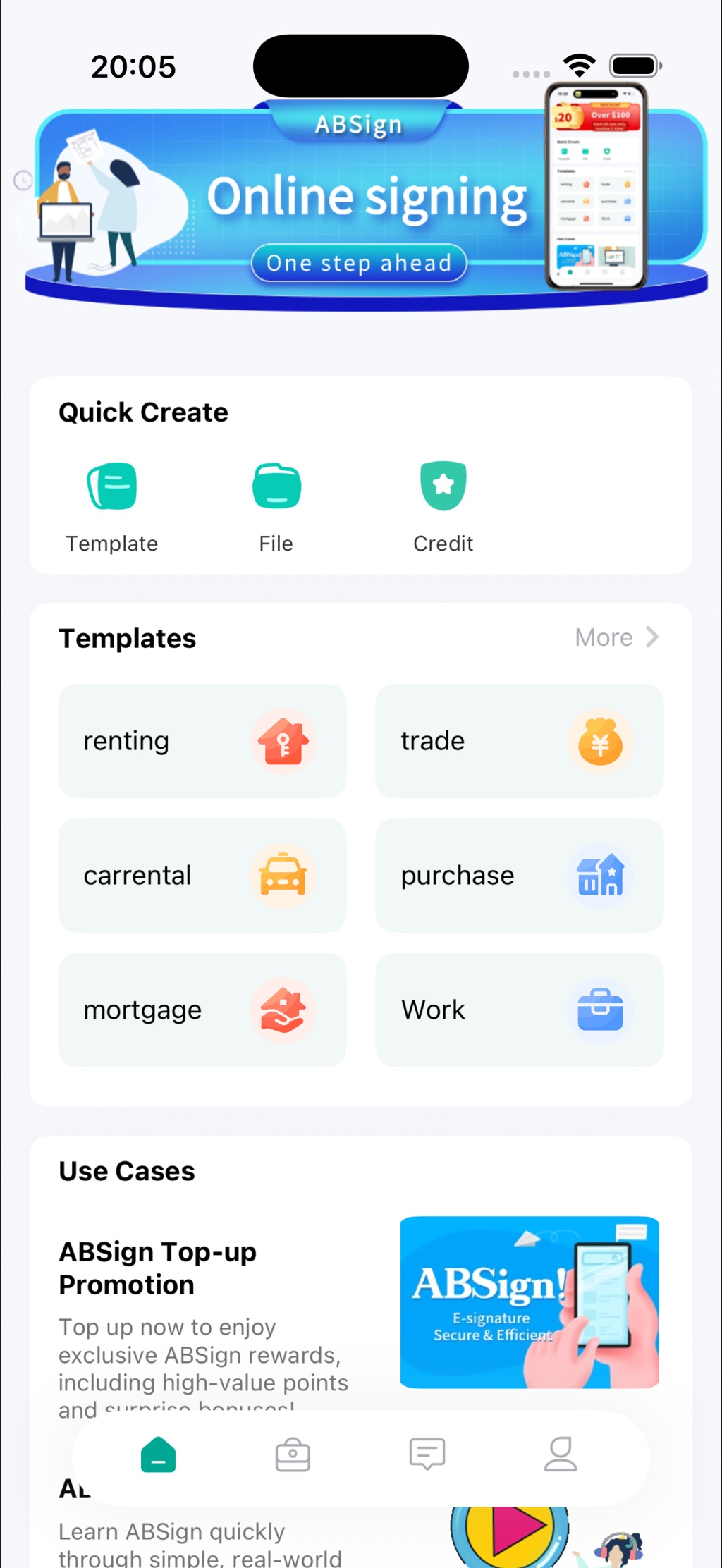
ABSign keeps everything on one bottom bar. Whatever you need is never more than one tap away.
Home
Quick Create buttons, the template library, and use-case highlights. This is where every contract starts.
Contracts
Everything you’ve created or received, with counters for To Pay, To Sign and Active.
Messages
Contract alerts and system messages — one row each, with an unread total. Tap one to jump straight to the contract.
Me
Log in here, check your Biz Verify status, and find My Tools: profile, signature, help and settings.
Set up your account
You can browse templates the moment the app opens — no account needed to look around. When you’re ready to sign, go to the Me tab and tap Login/Register.
Registering keeps every document attached to you: your drafts, your signatures, your counters, and your reminders.
- ✓Before login: explore the app and browse the full template library for free.
- ✓After login: create, sign, seal, send and track — your documents stay with your account across iPhone and iPad.
- ✓Your credit balance is visible under Credit on the home screen.
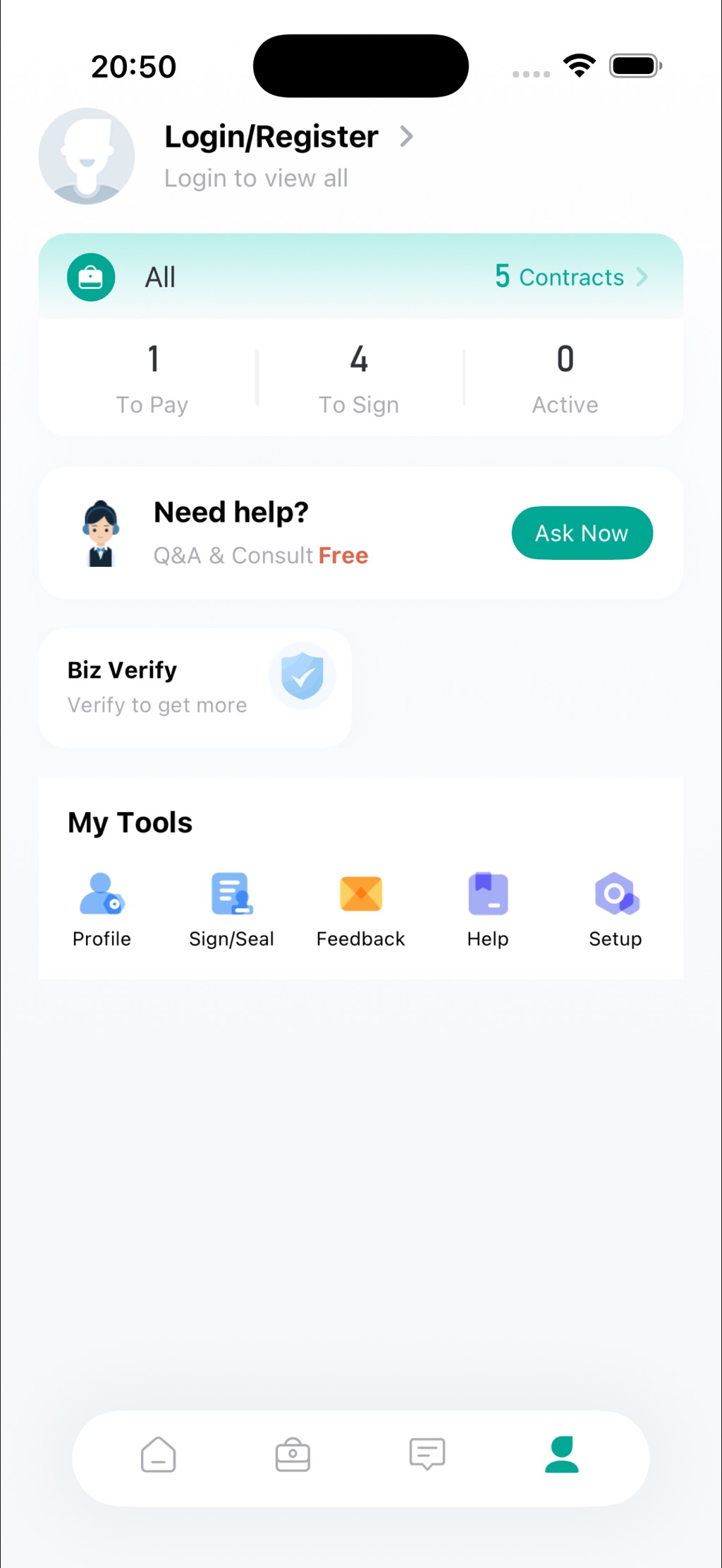
The Me tab — login, counters, Ask Now, Biz Verify
Start a contract — three doors, one screen
The Quick Create card sits right at the top of the home screen. Nothing hidden in menus.
Template
Start from a ready-made contract — renting, trade, car rental, purchase, mortgage or work. The template already has the right clauses; you fill in the details.
File
Already have a document? Upload your own file — a PDF the landlord sent, an NDA from a client — and sign it as-is.
Credit
Check your signing credit balance and top up when you need more. Credits cover signing volume — the app itself is free.
Pick the right template
The template library is organised by scenario. Browse the category tabs at the top — renting, trade, carrental, purchase, mortgage, Work — or type keywords into the search bar.
Renting alone covers seven real-life situations, each with its own clauses:
- ✓Each card tells you who it’s for — e.g. Student Apartment is tagged for overseas students, Sublease for second-hand tenants.
- ✓Tap a card to preview the contract, then fill in names, dates and amounts.
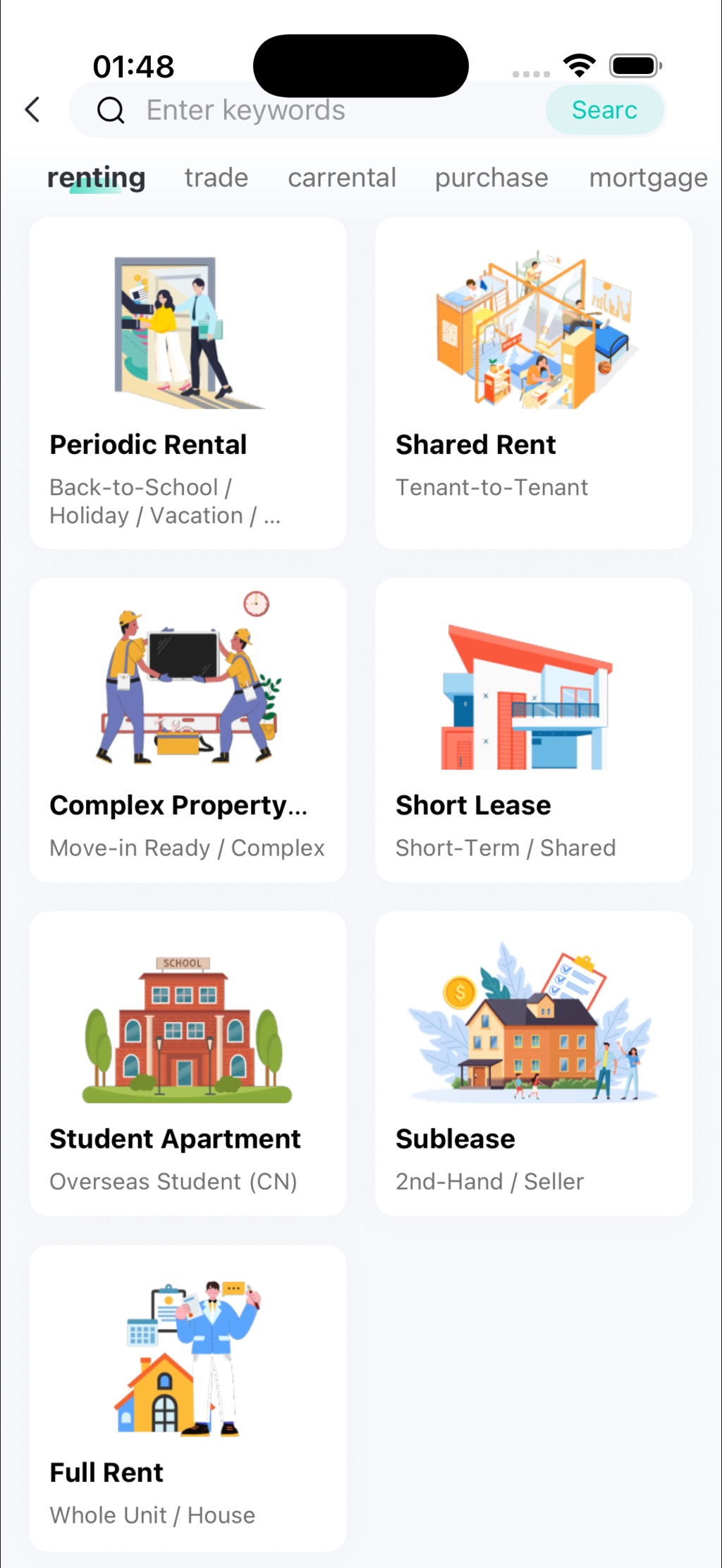
Template library — seven rental scenarios, tagged and searchable
Sign it, seal it
Open the contract and tap to sign. Draw your signature on screen with your finger or an Apple Pencil — it takes about three seconds. Then apply your seal from My Tools → Sign/Seal.
Both stay saved in the app, so the next contract is even faster.
- ✓Enterprise contracts show up on the same contract page — no separate login dance.
- ✓When your signature completes the contract, a short celebration plays — then you choose how to tell the other party.
Draw once — your signature is ready for every contract after
Send it across the border
Once signed, send the contract to the other party directly from the app — no printing, no scanning, no waiting for the embassy to open. Verification is built in, so what arrives is a verifiable signing record, not just a picture of a signature.
Need it official? ABSign also offers online notarization, so an agreement can go from draft to notarized without leaving the app.
- ✓Documents are encrypted in transit; signatures are tied to verified identity data.
- ✓Choose how to notify the other party right after the last signature lands.
Same workspace on iPad — a bigger canvas for long contracts
Track it to the end
The Contracts tab shows three counters on top: To Pay, To Sign and Active. One-row alerts and an unread total keep you oriented at a glance.
For anything signed, set a reminder date so nothing slips. Unpaid contracts can be paid — or deleted — right from the contract list.
- ✓Tap a notification in Messages to open the related contract instantly.
- ✓Reminders are yours to set — pick the date that matters, not the one an app guesses.
To Pay · To Sign · Active — the whole picture in one row
Two cards worth knowing
Both sit on the Me tab, and both are free to start.
Biz Verify
Verify your business identity once to unlock higher limits and enterprise features — “verify to get more”. Enterprise contracts then appear on the same contract page as everything else, with no separate login.
Ask Now
Stuck on a clause? Q&A and consult are built into the app and free to start — help while the deal is still warm, not three days after you’ve signed.
NEW IN v1.8.0 Shipped 6 October 2026
A signature celebration, custom reminder dates on signed contracts, pay-or-delete unpaid contracts from the list, enterprise contracts on the contract page, and one-row alerts with unread totals. Every step above reflects the current release.
Questions new users actually ask
Is the app really free?
Free to download from the App Store. Signing features work out of the box; paid plans cover higher volumes and team features. See the ABSign app plans page for details.
Do I need an account to try it?
You can browse templates and explore the app right away; signing and contract tracking ask you to log in or register so your documents stay attached to you.
What language is the app in?
The interface is in English today, with more languages on the roadmap. The templates themselves already cover cross-border scenarios used by Chinese and international users.
Is there an Android version?
Not yet — ABSign is currently iOS-only on iPhone and iPad. The web platform works in any mobile browser in the meantime, and Android will be announced on the app page when it ships.
How safe is my contract?
Documents are encrypted in transit, signatures are tied to verified identity data, and the Biz Verify flow adds business-level verification. Full detail lives on the Compliance & Security page.
Can the app notarize a contract?
Yes — ABSign offers online contract signing and notarization, so an agreement can go from draft to notarized without leaving the app. See the remote online notarization guide.
Eight steps. One thumb. Zero printers.
Now you know every screen. The next signature is 30 seconds away.
Questions before you download? Talk to us · App details on the ABSign app page